Texturing a mine wagon in maya for beginners Course

 (135 reviews)
-
 4 Lessons
-
 19 Students
- Certificate of completion


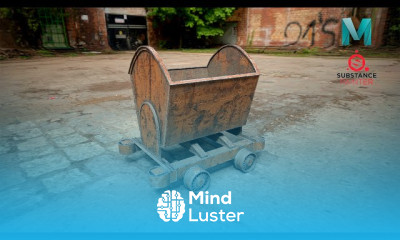
Texturing a mine wagon in maya course, in this course we will learn about Texturing a Mine Wagon in Maya, focusing on the essential techniques and workflows needed to create realistic and detailed textures for a 3D mine wagon. Texturing is a critical part of the 3D modeling process, where we bring life and authenticity to the digital model by applying materials, colors, and surface details that make it look like a real-world object. Starting with the basics, you'll learn how to prepare your mine wagon model for texturing by properly unwrapping the UVs, ensuring that textures can be applied seamlessly across the surface. We’ll explore how to create and apply various materials that simulate real-world surfaces like rusty metal, worn-out wood, and rugged wheels, which are typical of a mine wagon. You'll also learn how to use bump maps, normal maps, and ambient occlusion to add depth and detail to the model, making it look aged and weathered as it would in a mining environment. As you progress, the course will delve into more advanced texturing techniques, such as using substance materials and layering textures to create complex, multi-faceted surfaces. You'll also learn how to fine-tune your textures using Maya's shading networks and adjust lighting to enhance the visual impact of your textured model.
 To Register in Course you have to watch at least 30 Second of any lesson
What You'll Learn
-
 Create realistic mine wagon textures using UV unwrapping and seamless mapping techniques in Maya
-
Apply materials like rusted metal, worn wood, and rugged wheels to enhance mine wagon realism in Maya
-
Utilize bump maps, normal maps, and ambient occlusion to add depth and weathered effects to mine wagon textures in Maya
-
Implement advanced texturing workflows with substance materials and layered textures for detailed mine wagon surfaces
Course Content
4 Lessons • 1 h 3 m total

How to Model UV Texture a Mine Wagon in Maya Substance Painter Part 1 Modeling the base
How to Model UV Texture a Mine Wagon in Maya Substance Painter Part 2 Modeling the wagon
How to Model UV Texture a Mine Wagon in Maya Substance Painter Part 3 UV Unwrapping
How to Model UV Texture a Mine Wagon in Maya Substance Painter Part 4 Texturing the wagon
How to Get The Certificate
-
You must have an
Account
on the platform.
-
Complete all lessons.
-
Watch at least 50% of Lesson Duration.
-
Get your Certificate free 🎉 !
4.7
(135 reviews)
Overall rating

Reviews
Be the First One Review This Course
Related Courses
View All














Texturing a mine wagon in maya for beginners Course Description
Texturing a mine wagon in maya course, in this course we will learn about Texturing a Mine Wagon in Maya, focusing on the essential techniques and workflows needed to create realistic and detailed textures for a 3D mine wagon. Texturing is a critical part of the 3D modeling process, where we bring life and authenticity to the digital model by applying materials, colors, and surface details that make it look like a real-world object. Starting with the basics, you'll learn how to prepare your mine wagon model for texturing by properly unwrapping the UVs, ensuring that textures can be applied seamlessly across the surface. We’ll explore how to create and apply various materials that simulate real-world surfaces like rusty metal, worn-out wood, and rugged wheels, which are typical of a mine wagon. You'll also learn how to use bump maps, normal maps, and ambient occlusion to add depth and detail to the model, making it look aged and weathered as it would in a mining environment. As you progress, the course will delve into more advanced texturing techniques, such as using substance materials and layering textures to create complex, multi-faceted surfaces. You'll also learn how to fine-tune your textures using Maya's shading networks and adjust lighting to enhance the visual impact of your textured model.
Focus on Learning, Not Ads
Experience the full power of Mindluster with Premium.
No distractions, just pure education.
Cancel your subscription anytime
