Introduction to Adobe Photoshop Course

4.2 (35 reviews)
  • 39 Lessons
  • 900 Students
  • Certificate of completion

Adobe Photoshop has been the industry standard image editing software for 30 years, used globally by millions of professional and amateur photographers and .

To Register in Course you have to watch at least 30 Second of any lesson

What You'll Learn

  • Master essential Photoshop tools for professional photo editing and retouching techniques
  • Create and manipulate layers, masks, and selections for complex image compositions
  • Apply advanced color correction, adjustment layers, and blending modes for stunning visuals
  • Design compelling graphics, banners, and social media content using Photoshop features
  • Utilize keyboard shortcuts and workflow tips to enhance editing efficiency and productivity
  • Implement non-destructive editing methods to preserve image quality and flexibility
  • Use Photoshop filters, effects, and text tools to craft creative visual projects
  • Prepare images for print and digital publishing with proper resolution and file formats
  • Identify and troubleshoot common Photoshop issues for seamless editing experiences
  • Develop skills to edit portraits, landscapes, and product images professionally
  • Integrate Photoshop with other Adobe Creative Cloud applications for comprehensive design workflows
  • Build a strong foundation for advanced Photoshop techniques and creative projects

Course Content

39 Lessons • 10 h 6 m total

Photoshop Tutorials | Adobe Photoshop Tutorials Introduction

14:14

Adobe Photoshop Tutorial 2 Preferences and Settings

16:18

Adobe Photoshop Tutorial 3 learn photoshop Shapes Introduction

13:30

Adobe Photoshop Tutorial 4 Brushes Introduction

21:39

Adobe Photoshop Tutorial 5 Modify Selections

17:24

Adobe Photoshop Tutorial 6 Removing a Background From an Image

13:01

Adobe Photoshop Tutorial 7 Basic Vector Shapes and Editing

18:08

Adobe Photoshop Tutorial 8 More with Vectors

20:25

Adobe Photoshop Tutorial 9 Basic Color and Gradient

23:11

Adobe Photoshop Tutorial 10 Patch Content Aware and Red Eye tools

9:36

Adobe Photoshop Tutorial 11 Layer Masks and blending modes

17:42

Adobe Photoshop Tutorial 12 Meta Data

11:17

Adobe Photoshop Tutorial 13 Sharpening Images

15:53

Adobe Photoshop Tutorial 14 Working Between Photoshop and Illustrator

12:58

Adobe Photoshop Tutorial 15 Paragraph Panel and Styles

12:06

Adobe Photoshop Tutorial 16 Paragraph Panel and Paragraph Styles

12:04

Adobe Photoshop Tutorial 17 Text Tool and Character Panel

16:55

Adobe Photoshop Tutorial 18 Blending Modes 2 Creating Textures

19:03

Adobe Photoshop Tutorial 19 Advanced Selections

13:58

Adobe Photoshop Tutorial 20 Non Destructive Editing Adjustment Layers

14:07

Adobe Photoshop Tutorial 21 Selecting Hair and Advanced Selection

16:43

Adobe Photoshop Tutorial 22 Face Touch Up and Remove Blemishes

15:17

Adobe Photoshop Tutorial 23 Clone Stamping

16:20

Adobe Photoshop Tutorial 24 Healing and Spot Healing Brushes

14:06

Adobe Photoshop Tutorial 25 Histogram and an intro into Curves

10:46

Adobe Photoshop Tutorial 26 History and Art History Brush

13:37

Adobe Photoshop Tutorial 27 Liquify and Oil Paint

11:47

Adobe Photoshop Tutorial 28 Graphic Styles and Character Styles

14:09

Adobe Photoshop Tutorial 29 Actions Beginner

17:11

Adobe Photoshop Tutorial 30 Actions Intermediate

14:23

Adobe Photoshop Tutorial 31 Create Cool Broken Text Effect1

18:04

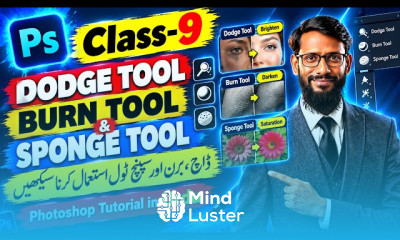
Adobe Photoshop Tutorial 32 Dodge Burn and Sponge

18:04

Adobe Photoshop Tutorial 33 Blur Sharpen and Smudge

12:11

Adobe Photoshop Tutorial 34 Color Replacement Tool

13:51

Adobe Photoshop Tutorial 35 Color Alpha and Spot Channels

12:35

Adobe Photoshop Tutorial 36 Using a Wacom also Drawing pt 1

22:54

Adobe Photoshop Tutorial 37 Drawing pt 2

18:47

Adobe Photoshop Tutorial 38 Drawing part 3 time lapse

16:09

Adobe Photoshop Tutorial 39 Grids Guides and Smart Guides

16:15

How to Get The Certificate

  • You must have an Account on the platform.
  • Complete all lessons.
  • Watch at least 50% of Lesson Duration.
  • Get your Certificate free 🎉 !

Certificate Example

Mind Luster Certificate Template

4.2 (35 reviews)

Overall rating

  • 5.0 49%
  • 4.0 34%
  • 3.0 6%
  • 2.0 11%
  • 1.0 0%

Reviews

Lazard Kamano

· 1mo ago

Excellent

Streng Geheim

· 3mos ago

top

Moloda Bayani

· 5mos ago

Good

Javad

· 5mos ago

It was great course for me. But if it has quizzes and more interactive activities, it would be great.

Yousaf Mohammadi

· 5mos ago

زما لپاره ډير ګټور کورس وو

Basmena Fida

· 5mos ago

Great

Sohaila

· 5mos ago

Useful

Hasina Mujadidi

· 6mos ago

great

Igor

· 1yr ago

Very useful.

Shen Perera

· 1yr ago

good

Mondithoka Ramesh

· 1yr ago

understanding concept

Abi Wonde

· 1yr ago

5

Introduction to Adobe Photoshop Course Description

Adobe Photoshop has been the industry standard image editing software for 30 years, used globally by millions of professional and amateur photographers and .

Focus on Learning, Not Ads

Experience the full power of Mindluster with Premium.
No distractions, just pure education.

Get Mindluster Premium

Cancel your subscription anytime
Course Intro