×
MindLuster Logo

Mastering Hyper V Windows Server

Track :

Programming

Lessons no : 8

For Free Certificate After Complete The Course

To Register in Course you have to watch at least 30 Second of any lesson

Join The Course Go To Community Download Course Content

What will you learn in this course?
  • Configure and deploy Hyper-V virtual machines for efficient server virtualization and management
  • Optimize Hyper-V performance for scalable, high-availability Windows Server environments
  • Implement Hyper-V networking and storage solutions to enhance virtual infrastructure security and reliability
  • Troubleshoot common Hyper-V issues to ensure seamless virtual machine operation and uptime
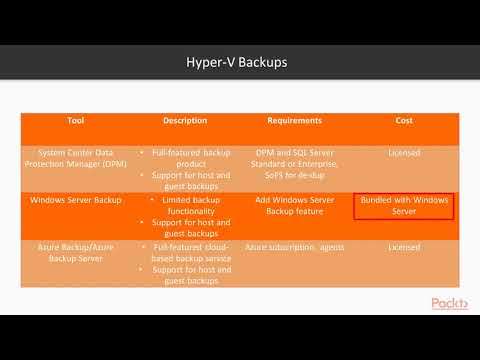
  • Manage Hyper-V snapshots, checkpoints, and backups for disaster recovery and data integrity
  • Integrate Hyper-V with Windows Server features to streamline enterprise virtualization workflows

How to Get The Certificate

  • You must have an account Register
  • Watch All Lessons
  • Watch at least 50% of Lesson Duration
  • you can follow your course progress From Your Profile
  • You can Register With Any Course For Free
  • The Certificate is free !
Lessons | 8


We Appreciate Your Feedback

Excellent
1 Reviews
Good
0 Reviews
medium
0 Reviews
Acceptable
0 Reviews
Not Good
0 Reviews
5
1 Reviews

Murad Sabbagh

cool
2025-12-21

Jehangir Khan

very nice
2025-05-21

Kailasa Kirna

Concepts clearly explained
2025-04-30

Markus Funke

super
2025-02-26

Ahmed PARE

cool
2025-02-07

Hamza Bilal

Good Overview
2024-10-25

Show More Reviews

Our New Certified Courses Will Reach You in Our Telegram Channel
Join Our Telegram Channels to Get Best Free Courses


Join Now

Related Courses

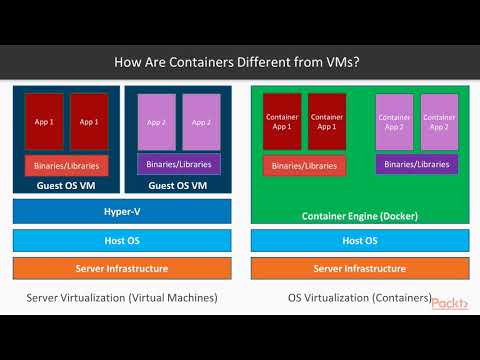
VirtualBox is what you'd use for directly working with a VM, especially if you need sound, USB, and a very wide range of supported OSes. Hyper-V is designed to host servers where you don't need a lot of extra desktop hardware (USB for example). Hyper-V should be faster than VirtualBox in a lot of scenarios.