×
MindLuster Logo

Excel drop down lists for beginners

Track :

Computer Softwares

Lessons no : 56

For Free Certificate After Complete The Course

To Register in Course you have to watch at least 30 Second of any lesson

Join The Course Go To Community Download Course Content
What will you learn in this course?
  • Create and implement basic drop-down lists using Excel Data Validation for accurate data entry
  • Design dynamic drop-down lists sourced from ranges, tables, and named ranges to automate options
  • Develop dependent drop-down lists that change based on previous selections for complex data scenarios
  • Customize drop-down list styles and appearance to improve worksheet aesthetics and usability
  • Apply conditional formatting to highlight valid or invalid selections within drop-down lists
  • Troubleshoot common issues with drop-down lists, including source errors and list updates
  • Use formulas to create dynamic and context-sensitive drop-down options for advanced data management
  • Enhance data integrity by standardizing inputs and reducing errors with well-structured drop-down lists
  • Integrate drop-down lists into data entry forms to streamline workflows and improve user experience
  • Manage and update existing drop-down lists efficiently for ongoing spreadsheet maintenance
  • Implement best practices for creating accessible and user-friendly drop-down lists in Excel
  • Evaluate and troubleshoot drop-down list functionality to ensure reliable data validation

How to Get The Certificate

  • You must have an account Register
  • Watch All Lessons
  • Watch at least 50% of Lesson Duration
  • you can follow your course progress From Your Profile
  • You can Register With Any Course For Free
  • The Certificate is free !
Lessons | 56
Show More Lessons


We Appreciate Your Feedback

Be the First One Review This Course

Excellent
0 Reviews
Good
0 Reviews
medium
0 Reviews
Acceptable
0 Reviews
Not Good
0 Reviews
0
0 Reviews

Our New Certified Courses Will Reach You in Our Telegram Channel
Join Our Telegram Channels to Get Best Free Courses


Join Now

Related Courses

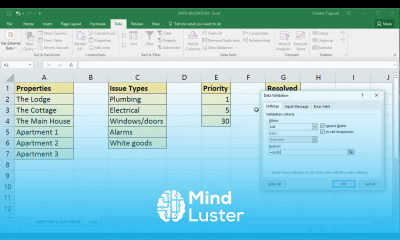
Excel drop down lists course, in this course we will learn about creating and managing drop-down lists in Excel, a powerful feature for enhancing data entry and ensuring consistency across your spreadsheets. You will discover how to set up drop-down lists using Data Validation, which allows users to select from predefined options, reducing errors and standardizing input. We will cover various methods for creating dynamic lists, including simple lists, dependent lists, and lists sourced from ranges or tables. Additionally, you’ll learn how to customize drop-down list styles, apply conditional formatting, and troubleshoot common issues. By the end of the course, you will be proficient in using Excel drop-down lists to streamline data entry and improve data integrity in your worksheets. Whether you’re a beginner or looking to refine your skills, this course will provide practical insights and hands-on experience to enhance your Excel proficiency. Join us to master the art of drop-down lists and make your Excel spreadsheets more efficient and user-friendly.