×
MindLuster Logo

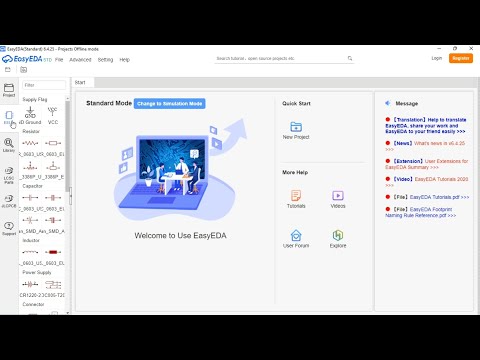
PCB DESIGN SOFTWARE INSTALLATION EASYEDA SOFTWARE INSTALLATION PART 1

Share your inquiries now with community members Click Here
Sign Up and Get Free Certificate
Sign up Now
Lesson extensions

Lessons List | 3 Lesson

Comments

Our New Certified Courses Will Reach You in Our Telegram Channel
Join Our Telegram Channels to Get Best Free Courses

Join Now

We Appreciate Your Feedback

Excellent
73 Reviews
Good
73 Reviews
medium
6 Reviews
Acceptable
1 Reviews
Not Good
1 Reviews
4.4
154 Reviews

SHOHEB YUSUF SHAIKH

It was informative
2026-04-26

Chittela Shruthi

Good explanation
2026-04-17

joyce

good course
2026-04-10

Shailendra Yadav

Good
2026-04-08

Boga Abhinav

good
2026-04-07

Islem Benhaha

Good
2026-03-21

ANURENJ A K

.
2026-03-20

NKEON DANY LHO BRULIV

Thanks
2026-03-17

SAHAYA SHARMILA A

very good
2026-03-17

L. jaya sanjay

well explained but need sub titles for other Mother tongue peoples to understand easy English subtitles
2026-03-11

Himanshu Prajapati

i am so happy
2026-03-09

M. Nivetha

Understand how to make pcb board
2026-03-02

Show More Reviews

Course Description

PCB design software installation, in this course is tailored to help beginners and professionals set up popular PCB design tools efficiently and without hassle. This course provides a step-by-step guide to installing commonly used software like Altium Designer, Eagle, KiCad, and EasyEDA. Learn how to download software, configure system requirements, and troubleshoot installation issues. Additionally, gain insights into licensing options, setting up user preferences, and integrating essential libraries for components. Through practical demonstrations, this course ensures that you can confidently prepare your system for PCB design projects. By the end, you’ll be ready to dive into PCB design with the right tools installed and configured for your needs, laying a strong foundation for electronics design.